Dissertation Title Page: Required Elements and Layout Rules
A complete guide to the Dissertation Title Page: required elements, layout rules, APA and university templates, and sample layouts.
Your dissertation title page is already being counted before anyone reads it. At many universities it's page i in the manuscript, even though no number is printed on it, and it's also the record librarians use to catalog your work. That's the dual job most students miss. One job is structural, as the first counted page. The other is administrative, as a standardized record of title, author, degree, institution, date, and committee. When a page gets returned, it usually fails one of those jobs, not the decoration.
Table of Contents
- Why the Title Page Is a Formal Record, Not a Cover
- Required Elements Every Title Page Carries
- Writing the Title and Degree Lines for Catalogs and Search
- How to Lay Out the Title Page Step by Step
- APA Style and University Templates Compared
- Institution Rules and Page Numbering That Vary
- Sample Layouts and Links to Other Front Matter
- Quick-Reference Checklist Before You Export the PDF
- Confirm the Final Layout With Your Graduate School
Why the Title Page Is a Formal Record, Not a Cover
A dissertation title page is a formal scholarly record before it is anything else. Your graduate school uses it to authenticate, catalog, approve, and preserve the work. Get a name, a degree line, or a date wrong and the problem is not cosmetic. The record itself is wrong, and the record is what follows your thesis into the library catalog.
The pattern holds across major universities even where the specifics divide. The University of Michigan formatting guidelines require at least a 2-inch top margin, a complete centered title, the word "by," the author's name, a degree statement, and doctoral committee information. Johns Hopkins University asks for the title, the author, a degree submission statement, the publishing location, and the submission month and year, naming "Baltimore, Maryland" and a date such as "April 2019." Both pages do the same job: they give a stranger enough structured information to confirm that this person submitted this work for this degree at this institution on this date. It works like a passport. The photograph is not the point; the fields are.
Counted, Even When It Looks Unnumbered
The University of Pennsylvania counts the title page as page "i" but does not allow a printed page number on it. The University of Illinois also requires no visible page number, and its margin and type-size rules should be checked in its current manual before you set up your document. The page sits inside the preliminary sequence with its number deliberately suppressed, so an unnumbered page is still a counted one. That is the second job, and it catches writers who assume an unnumbered sheet sits outside the manuscript.
Treat the title page as data first and design second. If the data does not match the institution's record, clean spacing will not save it.
Spacing, capitalization, committee presentation, and exact degree wording vary by institution. The administrative purpose does not. Every university needs standardized metadata so staff can verify who wrote the work, which degree it satisfies, who supervised it, and when it was submitted.
Your graduate school's manual governs first. Use the shared pattern to understand what belongs on the page, then use your own template for the exact wording, order, and spacing.
Required Elements Every Title Page Carries
Start by checking each line in the order it appears, not by copying a classmate's page and swapping the names.
| Element | What must show | Example | Institution pattern |
|---|---|---|---|
| Title | Complete, centered, title case; no bold or italics; two lines maximum where specified | Effects of Soil Moisture on Root Growth in Maize | USF, Michigan |
| Author name | Full name, matching the copyright page | by Jane Q. Researcher | Michigan, USF |
| Document type | Statement that the work is a dissertation | A Dissertation Submitted to the Faculty of the Graduate School | Ohio State |
| Degree statement | Degree spelled out, with the major left out where the school requires it | in partial fulfillment of the requirements for the degree of Doctor of Philosophy | USF, Johns Hopkins |
| Program or department | Graduate program name | Department of Chemistry | Ohio State |
| Institution and location | University name with city and state | Baltimore, Maryland | Johns Hopkins |
| Date | Month and year of submission, or conferral year | April 2019 | Johns Hopkins, UC Irvine |
| Committee members | Full names and ranks, with the chair designated | Chair, Professor Full Name | UC Irvine |
| Page number | No visible number; page counted as lowercase i | i (counted, not printed) | Penn, Illinois, Louisville |
This table is a union of recurring requirements, not a form you should copy blindly. If your institution doesn't ask for an element, remove it. If it doesn't allow an element, don't add it because another university requires it. A complete page is complete only against your own manual.
The Three Elements That Most Often Cause Trouble
Author name consistency causes preventable returns. Use your full name exactly as it appears on the copyright page, including middle initials, suffixes, and punctuation. Don't use a shortened form on one page and a legal form on another. Repository records and degree records should point to the same person without staff having to reconcile variants.
The degree statement must use the school's exact wording. Spell out the degree rather than abbreviating it, and leave out the major where the template requires that. Students often add a field because it feels informative, but that extra wording can make the line noncompliant. Copy the statement from the template instead of rewriting it in your own words.
Committee information needs more than surnames. Where required, give full names and academic ranks and designate the chair clearly. Don't copy an old committee list from a proposal if membership changed. The title page should reflect the committee connected with the final submission, not an earlier stage of the project.
Why the Document Type Line Matters
The document type statement tells indexers and administrators what kind of record they're handling. A dissertation, a master's thesis, and another graduate work may follow different approval and deposit rules. That line helps the catalog classify the work correctly from the start.
When every row has been checked, a finished page looks plain. There's no logo treatment, decorative border, or extra biographical detail competing with the record. Each line answers a specific administrative question, and each answer matches the corresponding page or form elsewhere in the submission.
Writing the Title and Degree Lines for Catalogs and Search
The title page has two jobs at once. It is the catalog record for the work, and it is the manuscript's first counted page. The title and degree lines do most of the catalog work, so they need to read cleanly in print and survive a search box.
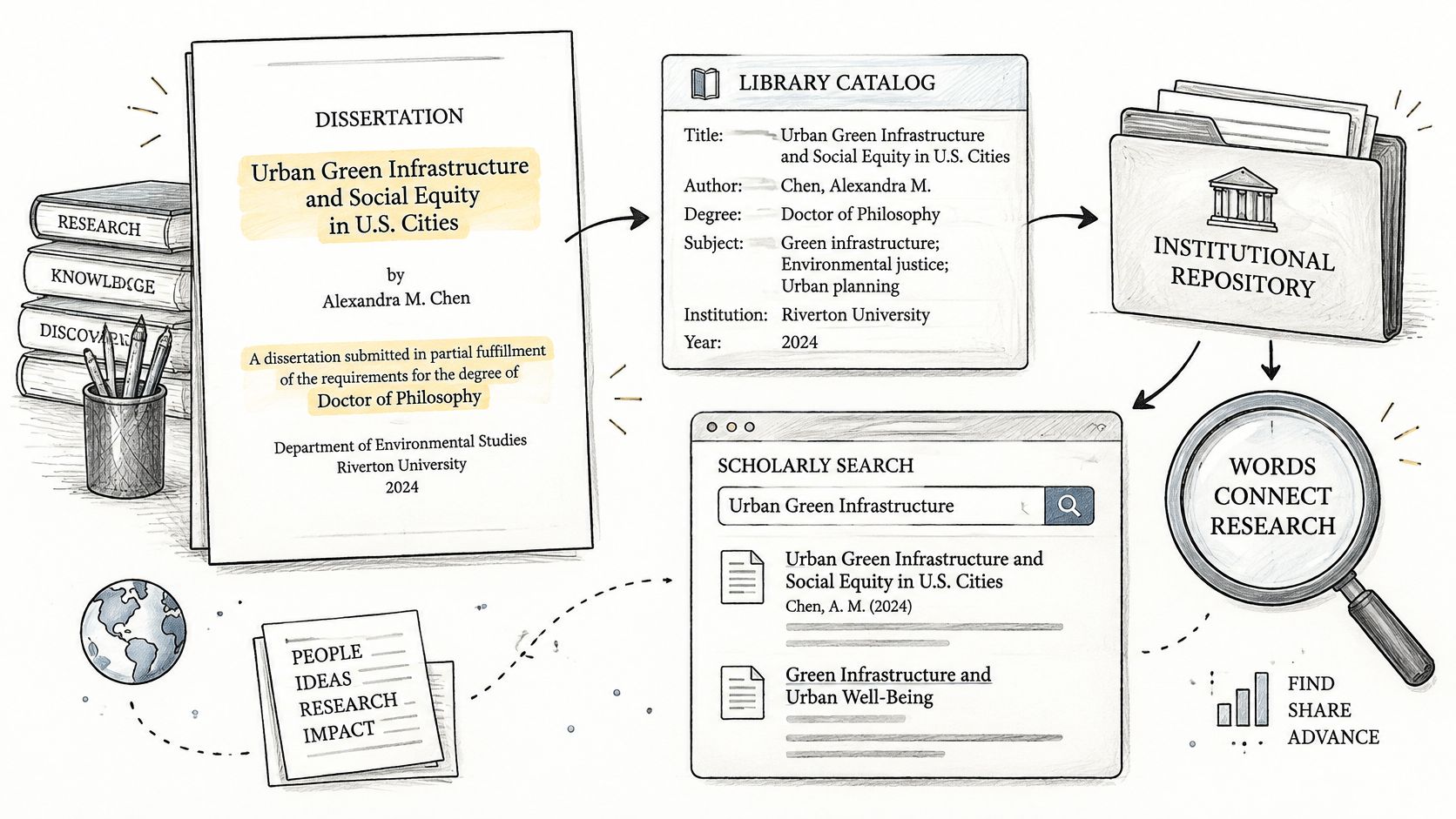
A title does not stop at the printed page. It feeds institutional repositories, library catalogs, and scholarly search systems, so a reader may meet those words in a results list before opening the PDF. If the title depends on a symbol that a search system handles poorly, the work becomes harder to retrieve. The title line should still sound like your research, but it also has to work as plain text.
The University of California, Irvine title page guide sets out the official degree title, dissertation title, author name, committee names and ranks, chair designation, and conferral year. It recommends replacing symbols or formulas with word substitutes so the title can be retrieved effectively from online indexes. Your template may also limit the title to a set number of lines, set a top-margin offset, or ban bold and italic styling. Treat those as template rules, not universal rules, and copy the page your graduate school issues rather than borrowing another university's layout.
Rewrite Symbols as Searchable Words
A chemistry title that uses a compact formula for carbon dioxide becomes searchable when the title writes Carbon Dioxide in words. A mathematics title built around an infinity symbol can use Infinity. The research is unchanged. The index gets a stable text string that another researcher can type, copy, and find.
Apply the same test to Greek letters, superscripts, subscripts, and abbreviations. Spell out an abbreviation on first use unless your field or template clearly expects otherwise. Avoid decorative punctuation that adds no meaning. A comma or colon that changes between the PDF, the abstract record, and the repository form can split one title into two mismatched records. Keep hard line breaks out of the title string as well. The catalog stores the words, not the way they happen to wrap on your page.
Keep Degree and Program Lines Identical Everywhere
The degree and program lines are matched fields, not decoration. A repository may store the degree and program in separate boxes, and staff compare those boxes with the title page. Copy the official degree title and program name from the template, then use the same wording on the abstract page and the repository form.
- Author name: Use one form everywhere, with the same initials and punctuation as your repository profile.
- Degree title: Use the official title, not a shortened department nickname.
- Program name: Copy the current program name, especially after a department merger or rename.
- Date or year: Match the submission or conferral date your school requires.
After deposit, search the exact title in your library catalog and check that the record shows the correct author and year. If it does not, report the mismatch while the submission is still easy to correct.
How to Lay Out the Title Page Step by Step
Work from the page settings inward. Don't type the lines first and then drag them around until the page looks balanced.
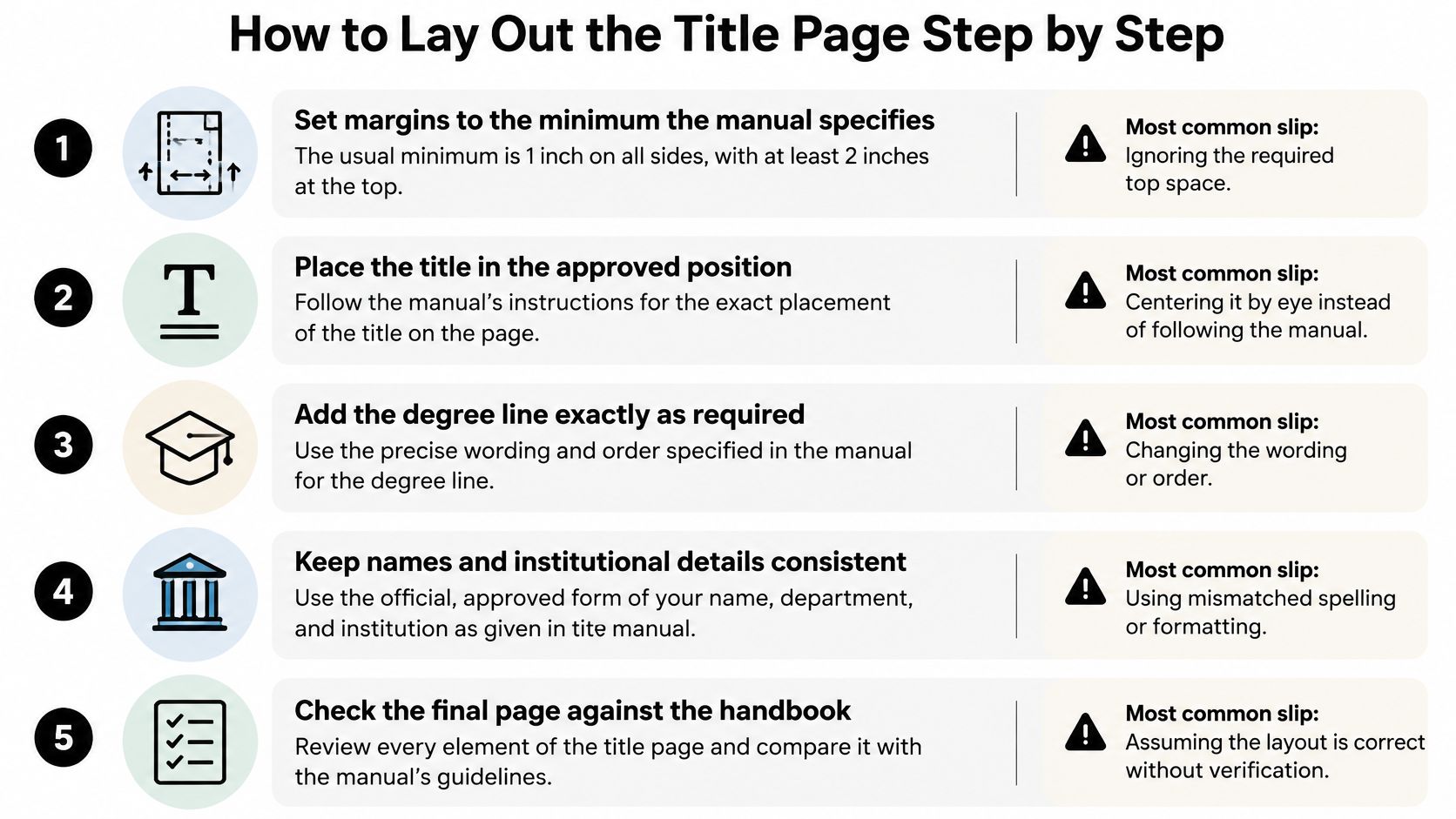
Set the margins first. Use the minimum your manual specifies, commonly 1 inch, and apply the larger top margin where your school requires it. The common slip is setting every margin alike and losing the required space above the title.
Set one font and size for the title block. Use the typeface and size named in the manual, commonly in the 10 to 12 point range where specified. Don't mix a default word processor font in one line with the dissertation font in another.
Center and position the title exactly. Follow the template's vertical placement, capitalization, and line breaks. Don't center by eye with blank lines you can't reproduce, and don't switch to all capitals unless the template uses them.
Add the document type and author lines. Copy the submission statement's line breaks from the template. Spell your name exactly as it appears on the copyright page, including initials.
Add degree, program, and institution lines separately. Keep each administrative field on its own centered line where the template does so. Combining lines to save space can break the required sequence and make a formatter send the page back.
Add location and date in the prescribed form. Use only the elements requested, such as city and state with month and year. Don't add a day, season, or defense date if the manual asks for a submission or graduation date instead.
Place committee names with the chair marked. Use full names and ranks where required, in the template's order. Check each spelling against the approval documentation, because a familiar name is still easy to mistype.
Suppress the visible number without resetting the count. The page should show no number while occupying its place in the preliminary sequence. In Microsoft Word, use section and header settings deliberately rather than deleting numbers page by page.
What Finished Looks Like on Screen
At 100 percent zoom, the block should look centered, calm, and evenly spaced, with no line crowding the top margin. Compare it side by side with the official template, not with another student's approved page from a different year. Templates change, and an old sample can preserve an outdated degree line or committee format.
Practical rule: If you can't explain why a blank line is there, check the template. Manual spacing built from repeated Enter keys often shifts during PDF conversion.
Use paragraph spacing settings where the template provides them. They are easier to inspect and correct than a stack of empty paragraphs. When the page matches the sample's order, wording, alignment, and vertical position, stop adjusting it for appearance.
APA Style and University Templates Compared
Students often ask whether they should follow APA or the graduate school template. For the title page itself, the answer is usually the template.
| Feature | APA 7 student title page | Typical university template |
|---|---|---|
| Title placement | Bold, centered, in the upper half of the page | Often plain or title case, as set by the template |
| Author line | Author name, centered | Full name matching the copyright page |
| Affiliation | Institution name, centered | Institution, department and degree statement |
| Course and instructor | Course number, instructor and due date | Replaced by committee members and the chair |
| Page number | Top right, with the title page counted as page 1 | No visible number; page counted as i |
| Running head | Not required for student papers | Set only if the template asks for it |
| Font and margins | 12-point Times New Roman, 1-inch margins | 1-inch margins, with a 2-inch top margin where the school requires it |
Where the Two Systems Conflict
The clearest conflict is pagination. An APA student paper displays the number on the title page and counts it as page 1. A dissertation template often suppresses the number and places the page in the lowercase Roman numeral sequence. You can't satisfy both treatments at once, so you must know which document you're producing.
The information blocks also serve different readers. APA's course and instructor lines help a teacher identify a class submission. A dissertation template replaces that teaching context with a degree statement, program, and committee, because the graduate school needs to verify an award. Adding course information to a dissertation page doesn't make it more complete. It makes it wrong for its purpose.
Title styling creates another trap. Bold type may be correct for an APA student paper, but a university may require a plain title with no bold or italics. Don't carry a seminar paper habit into the final manuscript without checking.
The Decision Rule
The university template wins for the dissertation title page. APA can still govern citations, references, headings, and other style matters where your program requires it. The formatting manual may also adopt selected APA features, such as a running head, but you shouldn't import them on your own.
Our broader academic writing guidelines can help you separate general style choices from submission formatting. That distinction matters because a well written paper can still fail a format review. Style guides and graduate school manuals answer different questions.
APA title pages are commonly used for seminar papers and proposals. Before using that layout for a final dissertation, ask one direct question: does the formatting manual name a title page style and edition, or does it provide its own required template? Get the answer in writing if the manual is ambiguous.
Institution Rules and Page Numbering That Vary
Institution rules are not cosmetic details. They decide whether your title page works as a catalog record and as page i of the manuscript. A title page has two jobs: it gives the graduate school and search databases a clean record of the degree and research, and it starts the preliminary pagination. A rejected title page usually fails one of those jobs, often because a student copied a format from another school.
One school may require title case while another mandates all capitals. Both rules can be correct in their own manual, which is why borrowing a title page across institutions is risky. The table below collects concrete rules from several manuals.
| Institution | Concrete rule stated |
|---|---|
| University of Michigan | At least 2-inch top margin; centered title; complete title; committee information |
| Johns Hopkins University | Month and year date, such as April 2019 |
| University of Pennsylvania | Title page counted as page i but not printed |
| University of Illinois | 1-inch margins; 10- or 12-point type; no page number |
| University of South Florida | Title begins 2 inches from top edge; title case; no bold or italics; two lines maximum |
| University of California, Irvine | Words instead of symbols; conferral year |
| University of Louisville | Lowercase Roman numeral i; not shown |
| University of Denver | No displayed number; counted in sequence |
The Pagination Logic Behind the Blank Page
Pagination works like the first mile marker on a route. You may not paint the number on the post, but the distance still starts there. Preliminary pages use lowercase Roman numerals. The title page occupies i, but the numeral isn't printed, so the next preliminary page can show ii. Restart the sequence after the title page and every following front matter number shifts. Print i to make the logic visible and you've also broken the rule.
The University of Denver dissertation and thesis formatting guidance states the page has no displayed number but is counted in sequence. Louisville assigns it lowercase Roman numeral i without displaying the numeral. Read those rows as clusters, not single settings. USF, for example, ties the title position to capitalization, weight, line count, author name, and degree wording.
Use a targeted quality check rather than rereading the whole manual each time.
- Visible number suppression: Confirm page one is blank where the number would appear.
- Roman numeral sequence: Confirm the next numbered preliminary page follows correctly.
- Margins and centering: Measure from the page edge, not from a header boundary.
- Capitalization and line breaks: Compare the title and submission statement with the sample.
- Exact degree wording: Check every word, including prepositions.
- Author name consistency: Compare letter by letter with the copyright page.
- PDF rendering: Recheck after export, not only in the source document.
These rules are institution specific, not universal best practices. A one minute method keeps them straight. Search your manual for "title page," copy each rule into a short checklist, and mark anything the template doesn't show so you can ask the formatting office before submission.
Sample Layouts and Links to Other Front Matter
Your title page doesn't sit alone. The title is repeated on the abstract and may appear on copyright and approval pages, so wording must match in every location. Your name must match the copyright page, and committee names must match the signed approval page. The table of contents and list of figures don't repeat the title page, but their preliminary pagination depends on it being counted correctly.
Understanding what a dissertation abstract contains helps you keep the title and author fields consistent between the two pages. Don't revise a title on the abstract after the title page has been approved unless you update every record that carries it.
Doctoral Sample in Page Order
Use these placeholders only to see the sequence. Replace each line with your template's exact text and spacing.
- Title: Effects of Soil Moisture on Root Growth in Maize
- Document type: A Dissertation Submitted to the Faculty of [University Name]
- Author: by [Full Name]
- Degree statement: in partial fulfillment of the requirements for the degree of Doctor of Philosophy
- Program: Department of [Program Name]
- Location: [City, State]
- Date: [Month Year]
- Committee: Chair, [Professor Full Name], followed by members where required
Each line maps to a required data category. The title identifies the research, the document type classifies it, the degree and program establish the award context, and the committee records supervisory authority. Nothing in the sample earns its place through decoration.
Master's Variant
For a master's thesis, change the document type wording and degree line to the official master's form, such as Master of Science where that is the award. Drop the committee block only if the school doesn't require it on the title page. Don't assume a doctoral sample can be shortened safely, because the master's template may require a different submission statement or approval information.
Never retype a line the official template already supplies. Paste your details into the template fields, preserve its line breaks, and compare the result with the copyright and approval pages. Retyping introduces small changes in capitalization, punctuation, and word order that are hard to spot later.
Quick-Reference Checklist Before You Export the PDF
Check the exported PDF, not only the Word or LaTeX source. A conversion can move a centered block, expose a page number, or replace a symbol with a missing glyph.
- Confirm page one is the title page. Failure prevented, preliminary pages shifted by an inserted blank page. If it fails, remove the extra page break rather than renumbering manually.
- Check the preliminary sequence. Failure prevented, the page after the title page restarting at i. Inspect section breaks, since a break set to restart numbering is a common cause.
- View page one at 100 percent zoom. Failure prevented, a visible number, off center title, or margin error hidden in a thumbnail. Compare the PDF beside the template sample.
- Confirm fonts are embedded. Failure prevented, substituted type changing line breaks or spacing. Use the PDF document properties or preflight panel to inspect fonts.
- Inspect special characters. Failure prevented, Greek letters or mathematical symbols disappearing from the title. Zoom in on every symbol, or use the searchable word form your school requires.
- Compare document properties. Failure prevented, repository metadata carrying an old title, author, or year. Set the PDF title and author fields to match the page before upload.
- Check committee names against the signed approval page. Failure prevented, an outdated member or misspelled rank entering the final record.
- Confirm the file name. Failure prevented, rejection or misfiling because the name doesn't follow the graduate school's naming rule.
A source file that looks correct isn't proof. The submitted PDF is the object reviewers and repositories actually receive.
For a wider submission review, see these common mistakes that delay thesis submission before you upload. Then print page one or view it on a second screen after conversion. A fresh view makes alignment drift and accidental headers easier to catch.
Mark each item pass or fail. Don't use a vague note such as "looks fine." If an item fails, fix the cause in the source, export again, and recheck the new PDF from page one.
Confirm the Final Layout With Your Graduate School
Title pages fail at the graduate school's desk for one of two reasons: the catalog record is wrong, or the manuscript's first counted page does not match the approved layout. Your graduate school's current manual and official template settle both jobs, so they outrank any general guide. The manual is the drawing; your page is the built part. The two must match. Don't choose the version that looks better.
The catalog record side covers the title, degree, and committee names. The counted page side covers margins and where page one sits. A pre-submission format check catches both before upload.
- Download the current manual and template for your exact degree and submission year.
- Compare every line with the required elements and note each difference.
- Request a pre-submission format check if one is offered, and keep the reply with your submission files.
- Schedule that check early so a returned page doesn't consume your final upload window.
Thesis Book Project was created to help students and researchers plan, write and complete theses and dissertations with confidence. Its Chapter tracker breaks a thesis into chapters and sections and tracks each one from outline to final draft, while the Thesis roadmap turns the whole project into a step by step path from proposal to submission. Add formatting review as its own milestone before submission. Once approval is settled, a guide to doctoral graduation regalia essentials can help you prepare for the ceremony itself.
Do one thing this week. Download the official template and compare it line by line with your current page.
Use Thesis Book Project to turn formatting review into a scheduled milestone, track every chapter and section from outline to final draft, and keep your submission sequence visible in one roadmap. Start your project there today so the title page check happens early, not in a last minute upload scramble.
Related Articles
APA Multiple Citations: Formats, Order and Examples
You're revising a literature review, and the sentence finally says what you mean. Then you reach...
Thesis WritingHow Long Should a Thesis Proposal Be? Word Count Guide
Most doctoral admissions proposals run about 1,500 to 2,000 words, while internal thesis proposals o...
Thesis WritingThesis and Roadmap: Plan Your Path to Submission
You've got a submission date somewhere in a programme handbook, a folder of half read papers, an...
Comments (0)
No comments yet. Be the first to share your thoughts.